thảo luận GNU/Linux, *nix - Thảo luận chung

  • Người tạo chủ đề Người tạo chủ đề idmresettrial
  • Ngày bắt đầu Ngày bắt đầu
Trạng thái
Không mở để trả lời thêm.
thế thím đọc lại comment của chính thím và thím kia chưa, thím ấy nói là remount lại rw là đc => chứng tỏ ko lq đến fastboot.
:D
Cảm ơn các thím ở trên nhé, vừa chạy sang Windows tắt thằng fastboot rồi qua Linux thì hết hẳn
zw4BEtD.png
zw4BEtD.png
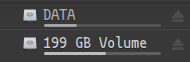
. Mà có cái vấn đề nhỏ khác là sao lúc khởi động máy 2 thằng disk (có sử dụng chung với Windows) không tự động chạy mà phải bắt buộc nhấn vào trên GUI thì nó mới thao tác được. Em mới xài Linux nên hơi gà
KFqnuI7.png
.

2020670a63c0-b467-49cf-ab83-e8a9c04629b5.png
Thím dùng distro gì với DE hay WM gì, thường một số distro có GUI phần config để auto mount luôn không thì như thím @idmresettrial ấy,
vào
Mã:
/etc/fstab
để mount các part cần.
 
Cảm ơn các thím ở trên nhé, vừa chạy sang Windows tắt thằng fastboot rồi qua Linux thì hết hẳn
zw4BEtD.png
zw4BEtD.png
. Mà có cái vấn đề nhỏ khác là sao lúc khởi động máy 2 thằng disk (có sử dụng chung với Windows) không tự động chạy mà phải bắt buộc nhấn vào trên GUI thì nó mới thao tác được. Em mới xài Linux nên hơi gà
KFqnuI7.png
.

2020670a63c0-b467-49cf-ab83-e8a9c04629b5.png
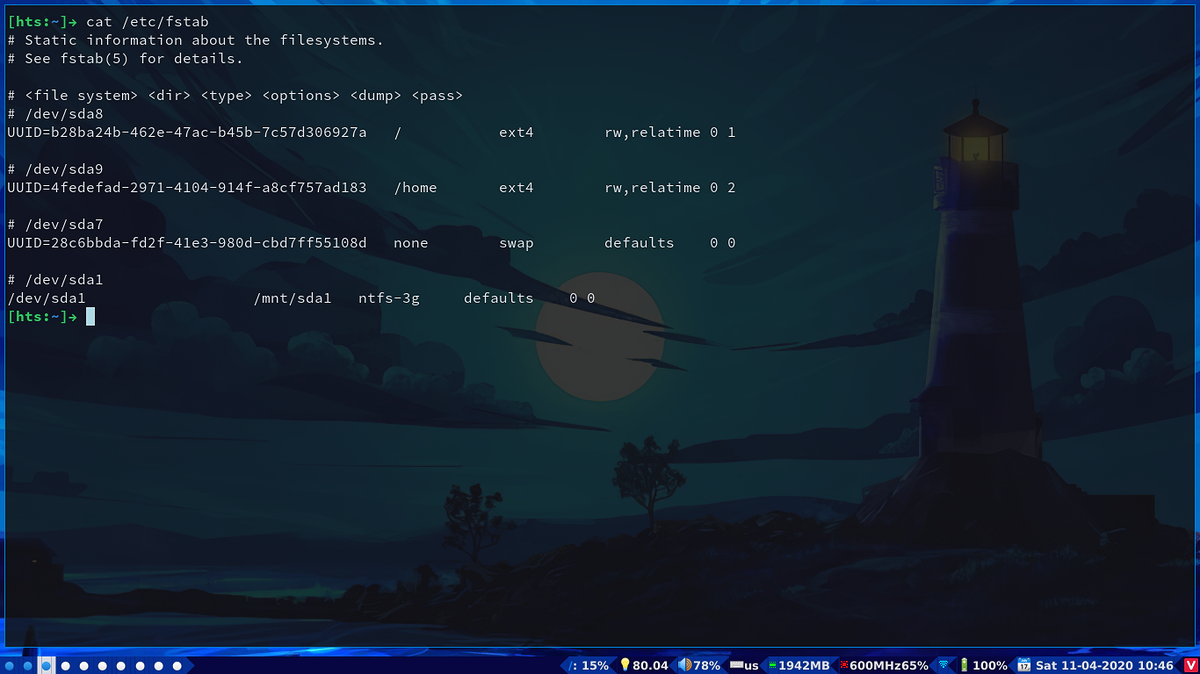
thím cài package ntfs-3g rồi edit file /etc/fstab thêm vào theo mẫu như này
(theo như trên hình thì /dev/sda1 là ntfs)
2020ef20c959-4570-408d-b34a-5298b01725bc.png
 
Hic, chụp screen bằng xwd, nhưng không sao sửa bằng ink được. Thôi chụp bằng phone vậy
thế chắc đúng rồi ấy fen, quên không nói đó là cái bar cũ của mình, thử dùng file này xem

Mã:
;==========================================================
;
;
;   ██████╗  ██████╗ ██╗  ██╗   ██╗██████╗  █████╗ ██████╗
;   ██╔══██╗██╔═══██╗██║  ╚██╗ ██╔╝██╔══██╗██╔══██╗██╔══██╗
;   ██████╔╝██║   ██║██║   ╚████╔╝ ██████╔╝███████║██████╔╝
;   ██╔═══╝ ██║   ██║██║    ╚██╔╝  ██╔══██╗██╔══██║██╔══██╗
;   ██║     ╚██████╔╝███████╗██║   ██████╔╝██║  ██║██║  ██║
;   ╚═╝      ╚═════╝ ╚══════╝╚═╝   ╚═════╝ ╚═╝  ╚═╝╚═╝  ╚═╝
;
;
;   To learn more about how to configure Polybar
;   go to https://github.com/polybar/polybar
;
;   The README contains a lot of information
;
;==========================================================

[colors]
darkred = ${xrdb:color1:#cc241d}
darkgreen = ${xrdb:color2:#98971a}
darkyellow = ${xrdb:color3:#d79921}
darkblue = ${xrdb:color4:#458588}
darkmagenta = ${xrdb:color5:#b16286}
darkcyan = ${xrdb:color6:#689d6a}
lightgray = ${xrdb:color7:#a89984}
gray = ${xrdb:color8:#928374}
red = ${xrdb:color9:#fb4934}
green = ${xrdb:color10:#b8bb26}
yellow = ${xrdb:color11:#fabd2f}
blue = ${xrdb:color12:#83a598}
magenta = ${xrdb:color13:#d3869b}
cyan = ${xrdb:color14:#8ec07c}
white = ${xrdb:color15:#ebdbb2}

; background = #070642
background = #062f96
background-1 = #062f96
; background = ${colors.background-alt}
;background-alt = #444
background-alt = #070642
background-alt-1 = #070642

module-background = #444
;foreground = ${xrdb:color7:#222}
foreground = #dfdfdf
foreground-alt = #555
primary = #ffb52a
secondary = #e60053
alert = #bd2c40

[bar/example]
;monitor = ${env:MONITOR:HDMI-1}
width = 100%
height = 20
;offset-x = 1%
;offset-y = 1%
radius = 0.0
fixed-center = false
; separator =
separator-font = 6
background = ${colors.background-alt-1}
foreground = ${colors.foreground}
background-center = ${colors.background-alt}
line-size = 0
underline-height = 0
line-color = #f00

border-size = 0
border-color = #00000000

padding-left = 0
padding-right = 0

module-margin-left = 0
module-margin-right = 0
bottom = true
;font-0 = fixed:pixelsize=10;1
;font-1 = unifont:fontformat=truetype:size=8:antialias=false;1
font-0 = Incosolata Nerd Font::pixelsize=5:style=bold;3
font-1 = Incosolata Nerd Font:pixelsize=5:style=bold;3
font-2 = "Siji:pixelsize=10;1"
font-3 = "Noto Color Emoji:style=Regular:scale=20:antialias=false:size=1;2"
font-4 = "Noto Color Emoji:style=Regular:scale=20:antialias=false:size=1;2"
font-5 = "Noto Color Emoji:style=Regular:scale=1:antialias=false:size=1;2"
; Workspace fonts
font-6 = "Noto Color Emoji:style=Regular:scale=30:antialias=false:size=1;2"
font-7 = Source Code Pro:font-format=truetype:pixelsize=5:style=Bold;1
font-8 = Hack Nerd Font Mono:size=6;3

dpi = 192
modules-left = bspwm arrow
modules-center = mpd
modules-right = arrow1 filesystem arrow2 screen arrow1 pulseaudio arrow2 xkeyboard arrow1 memorystat arrow2 cpufreq cpu arrow1 wlan eth arrow2 battery arrow1 date arrow2
tray-position = right
tray-padding = 0
;tray-background = #0063ff
;tray-background = #ff0000
tray-background = ${colors.background-alt}
; tray-underline = #ff0000

wm-restack = bspwm
;wm-restack = i3

;override-redirect = true

;scroll-up = bspwm-desknext
;scroll-down = bspwm-deskprev

;scroll-up = i3wm-wsnext
;scroll-down = i3wm-wsprev

cursor-click = pointer
cursor-scroll = ns-resize
[module/ccases]
type = custom/script
format = <label>
exec = bash ~/.config/bspwm/track_script.sh -c VN -r -n | grep "Cases" |grep -Eo '[0-9]{1,4}'
format-background =
format-foreground = #ff0000
label = 🤒%output%
interval = 10
; label-underline = #ff0000

[module/arrow]
type = custom/text
content-padding = 0
content = 
content-font = 9
content-background = ${colors.background-alt}
content-foreground = ${colors.background}

[module/cdeath]
type = custom/script
format = <label>
exec = bash ~/.config/bspwm/track_script.sh -c VN -r -n | grep "Death" |grep -Eo '[0-9]{1,4}'
label =  😱%output%
format-background = ${colors.background-alt}
interval = 10
label-underline = #ffffff
 
[module/crec]
type = custom/script
format = <label>
exec = bash ~/.config/bspwm/track_script.sh -c VN -r -n | grep "Recovered" |grep -Eo '[0-9]{1,4}'
label = 😷%output%
format-foreground = #32CD32
interval = 10
label-underline = #0000ff
 
[module/screen]
type = custom/script
exec = light -G
format-prefix = 💡
format-prefix-font = 5
format-background = ${colors.background-alt}
scroll-up = light -A 5
scroll-down = light -U 5
interval = 1

[module/xwindow]
type = internal/xwindow
format = <label>
label = < %title:0:20:...% >
label-font = 8
; label-maxlen = %token:0:40%
; label-underline = #33cc00
label-alignment = center
format-background = ${colors.background-alt}
format-width = 10
label-empty = < Empty >
[module/xkeyboard]
type = internal/xkeyboard
blacklist-0 = num lock
blacklist-1 = caps lock
format = <label-layout><label-indicator>
format-padding = 0
;format-prefix = " "
label-layout-padding = 0
format-prefix = ⌨
;format-prefix = ⌨️
format-prefix-font = 5
format-prefix-foreground = ${colors.foreground-alt}
format-background = ${colors.background-alt}
; format-prefix-underline = ${colors.secondary}

label-layout = %layout%
; label-layout-underline = ${colors.secondary}

label-indicator-padding = 0
label-indicator-margin = 0
label-indicator-background = ${colors.background-alt}
; label-indicator-underline = ${colors.background}

[module/filesystem]
type = internal/fs
interval = 25

mount-0 = /
format-mounted-padding = 0
label-mounted = %{F#0a81f5}%mountpoint%%{F-}: %percentage_used%%
label-unmounted = %mountpoint% not mounted
label-unmounted-foreground = ${colors.foreground-alt}
format-mounted = <label-mounted>
format-unmounted = <label-unmounted>

format-mounted-background = ${colors.background}
format-unmounted-background = ${colors.background}
[module/bspwm]
type = internal/bspwm
label-focused-font = 7
label-empty-font = 7
label-occupied-font = 7
label-focused = 🔵
label-focused-background = ${colors.lightgray}
; label-focused-underline= ${colors.primary}
label-focused-padding = 1

; label-occupied = %index%
label-font = 7
label-occupied = 🔵
label-occupied-padding = 1
label-occupied-background= ${colors.background}
label-urgent = %index%!
label-urgent-background = ${colors.alert}
label-urgent-padding = 1

; label-empty = %index%
label-empty = ⚪
label-empty-foreground = ${colors.foreground-alt}
label-empty-padding = 1
label-empty-background= ${colors.background}
; Separator in between workspaces
; label-separator = |

[module/i3]
type = internal/i3
format = <label-state> <label-mode>
index-sort = true
wrapping-scroll = false

; Only show workspaces on the same output as the bar
;pin-workspaces = true

label-mode-padding = 2
label-mode-foreground = #000
label-mode-background = ${colors.primary}

; focused = Active workspace on focused monitor
label-focused = %index%
label-focused-background = ${colors.background-alt}
; label-focused-underline= ${colors.primary}
label-focused-padding = 2

; unfocused = Inactive workspace on any monitor
label-unfocused = %index%
label-unfocused-padding = 2

; visible = Active workspace on unfocused monitor
label-visible = %index%
label-visible-background = ${self.label-focused-background}
; label-visible-underline = ${self.label-focused-underline}
label-visible-padding = ${self.label-focused-padding}

; urgent = Workspace with urgency hint set
label-urgent = %index%
label-urgent-background = ${colors.alert}
label-urgent-padding = 2

; Separator in between workspaces
; label-separator = |


[module/mpd]
type = internal/mpd
;format-online = <label-song>  <icon-prev> <icon-stop> <toggle> <icon-next>
format-online = <label-song> <label-time>
label-song = 🎶%title%🎶
icon-prev = 
icon-stop = 
icon-play = 
icon-pause = 
icon-next = 

label-song-maxlen = 30
label-song-ellipsis = true

[module/xbacklight]
type = internal/xbacklight
format-prefix = 💻
format-prefix-font = 5
format = <label> <bar>
label = BL

format-background = ${colors.background-alt}

bar-width = 10
bar-indicator = |
bar-indicator-foreground = #fff
bar-indicator-font = 2
bar-fill = ─
bar-fill-font = 2
bar-fill-foreground = #9f78e1
bar-empty = ─
bar-empty-font = 2
bar-empty-foreground = ${colors.foreground-alt}

[module/backlight-acpi]
inherit = module/xbacklight
type = internal/backlight
card = intel_backlight
format-background = ${colors.background-alt}

[module/cpufreq]
type = custom/script
interval = 2
exec = cpupower frequency-info --freq --human | grep current | awk '{ print $4 $5 }'
format-background = ${colors.background-alt}
format-prefix = ""
;format-prefix = 💠
;format-prefix-font = 5
format-prefix-foreground = #FF0000
; format-underline = #f90000
label =  %output:4%
; format-background = #f90000


[module/cpu]
type = internal/cpu
interval = 2
format-background = ${colors.background-alt}
; format-prefix = ""
;format-prefix = 💠
;format-prefix-font = 5
format-prefix-foreground = #FF0000
; format-underline = #f90000
label = %percentage:2%%
; format-background = #f90000
[module/memorystat]
type = custom/script
interval = 2
format-prefix-font = 5
format-prefix = ""
format-prefix-foreground = #00FF00
label-foreground = ${colors.foreground}
; format-underline = #4bffdc
exec = free -t -m | grep Mem | awk '{print $3}'
label = %output%MB
format-background = ${colors.background}

ormat-prefix = ""
[module/memory]
type = internal/memory
interval = 2
format-prefix = ""
;format-prefix = 🔷
format-prefix-font = 5
format-prefix-foreground = #00FF00
label-foreground = ${colors.foreground}
; format-underline = #4bffdc
label = %percentage_used%%
format-background = ${colors.background}

[module/wlan]
type = internal/network
interface = wlp1s0
interval = 3.0

; format-background = ${colors.background}
format-connected = <ramp-signal><label-connected>
format-connected-padding = 0

format-connected-background = ${colors.background}
; format-connected-underline = #9f78e1
; label-connected = %essid%

; label-connected = %downspeed:4%
label-connected =
accumulate-stats = true
format-disconnected =
;format-disconnected = <label-disconnected>
;format-disconnected-underline = ${self.format-connected-underline}
;label-disconnected = %ifname% disconnected
;label-disconnected-foreground = ${colors.foreground-alt}

ramp-signal-0 = 
ramp-signal-1 = 
ramp-signal-2 = 
ramp-signal-3 = 
ramp-signal-4 = 
ramp-signal-foreground = #00FFFF

[module/eth]
type = internal/network
interface = enp2s0
interval = 3.0

; format-connected-underline = #55aa55
;format-connected-prefix = " "
format-connected-prefix = "🌐"
format-connected-prefix-font = 5
format-connected-prefix-foreground = ${colors.foreground-alt}
format-connected-background = ${colors.background}
;format-connected-prefix-alt = "" "
;label-connected = %local_ip%
;label-connected = "Wired"
label-connected = %downspeed%
;label-connected-alt = "Connected"
;format-connected-alt = "Connected"
format-disconnected =
;format-disconnected = <label-disconnected>
;format-disconnected-underline = ${self.format-connected-underline}
;label-disconnected = %ifname% disconnected
;label-disconnected-foreground = ${colors.foreground-alt}

[module/arrow1]
type = custom/text
content = 
content-font = 9
content-foreground = ${colors.background}
content-background = ${colors.background-alt}

[module/arrow2]
type = custom/text
content = 
content-font = 9
content-foreground = ${colors.background-alt}
content-background = ${colors.background}

[module/date]
type = internal/date
interval = 5-

date = "%a %d-%m-%Y"
date-alt = " %Y-%m-%d"

time = %H:%M
time-alt = %H:%M:%S
format = <label>
;format-prefix = 
format-prefix-background = ${colors.background-alt}
format-prefix-foreground = ${colors.background}
;format-underline = #0a6cf5
format-background= ${colors.background}
label =📆 %date% %time%

[module/pulseaudio]
type = internal/pulseaudio

format-volume-prefix-font = 5
format-volume-prefix = 🔊
; format-volume = <label-volume> <bar-volume>
format-volume = <label-volume>

format-volume-background = ${colors.background}
label-volume = %percentage%%
label-volume-font = 2

label-volume-foreground = ${root.foreground}

label-muted = 🔇 muted
label-muted-font = 5
label-muted-foreground = #666
label-muted-background = ${colors.background}
bar-volume-width = 10
bar-volume-foreground-0 = #55aa55
bar-volume-foreground-1 = #55aa55
bar-volume-foreground-2 = #55aa55
bar-volume-foreground-3 = #55aa55
bar-volume-foreground-4 = #55aa55
bar-volume-foreground-5 = #f5a70a
bar-volume-foreground-6 = #ff5555
ramp-NAME-font = 5
ramp-NAME-0 = 🔈
ramp-NAME-1 = 🔉
ramp-NAME-2 = 🔊
bar-volume-gradient = false
bar-volume-indicator = |
bar-volume-indicator-font = 2
bar-volume-fill-font = 2
bar-volume-fill = ─
;bar-volume-fill-font = 2
bar-volume-empty = ─
bar-volume-empty-font = 2
bar-volume-empty-foreground = ${colors.foreground-alt}

[module/alsa]
type = internal/alsa

format-volume = <label-volume> <bar-volume>
label-volume = VOL %percentage%%
label-volume-foreground = ${root.foreground}

format-muted-prefix = " "
format-muted-foreground = ${colors.foreground-alt}
label-muted = sound muted

bar-volume-width = 10
bar-volume-foreground-0 = #55aa55
bar-volume-foreground-1 = #55aa55
bar-volume-foreground-2 = #55aa55
bar-volume-foreground-3 = #55aa55
bar-volume-foreground-4 = #55aa55
bar-volume-foreground-5 = #f5a70a
bar-volume-foreground-6 = #ff5555
bar-volume-gradient = false
bar-volume-indicator = |
bar-volume-indicator-font = 2
bar-volume-fill = ─
bar-volume-fill-font = 2
bar-volume-empty = ─
bar-volume-empty-font = 2
bar-volume-empty-foreground = ${colors.foreground-alt}

[module/battery]
type = internal/battery
battery = BAT0
format-background = ${colors.background-alt}
adapter = AC
full-at = 100

format-charging = <animation-charging> <label-charging>
; format-charging-underline = #ffb52a
format-charging-background = ${colors.background-alt}
format-discharging = <animation-discharging> <label-discharging>
format-discharging-background =  ${colors.background-alt}
; format-discharging-underline = ${self.format-charging-underline}

;format-full-prefix = " "
format-full-prefix = 🔋
format-full-prefix-font = 5
format-full-prefix-foreground = ${colors.foreground-alt}
; format-full-underline = ${self.format-charging-underline}
format-full-background = ${colors.background-alt}

ramp-capacity-0 = 
ramp-capacity-1 = 
ramp-capacity-2 = 
ramp-capacity-foreground = #32CD32

animation-charging-0 = 
animation-charging-1 = 
animation-charging-2 = 
animation-charging-foreground = #0000FF
animation-charging-framerate = 750

animation-discharging-0 = 
animation-discharging-1 = 
animation-discharging-2 = 
animation-discharging-foreground = #FFFF00
animation-discharging-framerate = 10000

[module/temperature]
type = internal/temperature
thermal-zone = 0
warn-temperature = 60

format = <ramp> <label>
format-underline = #f50a4d
format-warn = <ramp> <label-warn>
format-warn-underline = ${self.format-underline}

label = %temperature-c%
label-warn = %temperature-c%
label-warn-foreground = ${colors.secondary}

ramp-0 = 
ramp-1 = 
ramp-2 = 
ramp-foreground = ${colors.foreground-alt}
[module/powermenu]
type = custom/menu

expand-right = true

format-spacing = 1
format-padding = 1
label-open = 
label-open-foreground = ${colors.secondary}
; label-open-background = ${colors.secondary}
label-close =  cancel
label-close-foreground = ${colors.secondary}
; label-close-background = ${colors.secondary}
label-separator = |
label-separator-foreground = ${colors.foreground-alt}
; label-separator-background = ${colors.foreground-alt}

menu-0-0 = reboot
menu-0-0-exec = menu-open-1
menu-0-1 = power off
menu-0-1-exec = menu-open-2

menu-1-0 = cancel
menu-1-0-exec = menu-open-0
menu-1-1 = reboot
menu-1-1-exec = sudo reboot

menu-2-0 = power off
menu-2-0-exec = sudo poweroff
menu-2-1 = cancel
menu-2-1-exec = menu-open-0

[settings]
screenchange-reload = true
;compositing-background = xor
;compositing-background = screen
;compositing-foreground = source
;compositing-border = over
compositing-underline = under
;pseudo-transparency = false

[global/wm]
margin-top = 5
margin-bottom = 5

; vim:ft=dosini
 
Mấy thím cứ thích dùng mấy cái dị hợm làm gì cho khổ dâm nhỉ. :sweat:
Chán cơm sẽ thèm phở thôi. Nhiều người chưa chán cơm mà vẫn thèm phở nữa.
Nhiều khi chỉ là thử thách tính kiên trì.
Xét về hiệu suất lao động, thì mấy thứ dị hợm đó quá tệ. Nhưng xét về tính giải trí, nó cũng khá tốt.
 
Chán cơm sẽ thèm phở thôi. Nhiều người chưa chán cơm mà vẫn thèm phở nữa.
Nhiều khi chỉ là thử thách tính kiên trì.
Xét về hiệu suất lao động, thì mấy thứ dị hợm đó quá tệ. Nhưng xét về tính giải trí, nó cũng khá tốt.
xài mấy cái như bspwm thấy làm việc tiện hơn ấy chứ
 
Cảm ơn các thím ở trên nhé, vừa chạy sang Windows tắt thằng fastboot rồi qua Linux thì hết hẳn
zw4BEtD.png
zw4BEtD.png
. Mà có cái vấn đề nhỏ khác là sao lúc khởi động máy 2 thằng disk (có sử dụng chung với Windows) không tự động chạy mà phải bắt buộc nhấn vào trên GUI thì nó mới thao tác được. Em mới xài Linux nên hơi gà
KFqnuI7.png
.

2020670a63c0-b467-49cf-ab83-e8a9c04629b5.png
Khả năng cao là do chưa mount đó fence, bấm vào nó mới mount. Tìm cách chỉnh auto mount cho mấy disk đó đi.
 
kiểu đường quang ko đi thích quàng bụi rậm, để đi qua rồi tạo ra ảo tưởng là mình thật pro ấy hả. 🤣
 
kiểu đường quang ko đi thích quàng bụi rậm, để đi qua rồi tạo ra ảo tưởng là mình thật pro ấy hả. 🤣
xem ông Luke Smith trên youtube nhiều quá nên bị nhiễm rồi fen à :beat_shot: chẳng dám nhận tài giỏi gì :beat_plaster: cơ mà thấy dùng kiểu này tiện thì dùng :beauty:
 
mấy ông trong đây đa phần nghịch linux là chính.
chứ còn dùng linux để sử dụng, thứ nhất, phải thân thiện, thứ 2 phải ổn định.
arch hay wm chủ yếu để nghịch chứ để làm việc ai dùng
 
mấy ông trong đây đa phần nghịch linux là chính.
chứ còn dùng linux để sử dụng, thứ nhất, phải thân thiện, thứ 2 phải ổn định.
arch hay wm chủ yếu để nghịch chứ để làm việc ai dùng
không biết fen làm việc gì chứ hiện tại linux thấy quá đủ cho mọi nhu cầu rồi :beauty:
thân thiện thì có thể custom nó lại cho phù hợp với mình
soạn văn bản, viết thuyết trình, nhất là code đủ tốt.
 
không biết fen làm việc gì chứ hiện tại linux thấy quá đủ cho mọi nhu cầu rồi :beauty:
thân thiện thì có thể custom nó lại cho phù hợp với mình
soạn văn bản, viết thuyết trình, nhất là code đủ tốt.
soạn văn bản với thuyết trình thì khuyên fen nên chuyển sang bộ office
 
Trạng thái
Không mở để trả lời thêm.

Thống kê chủ đề

Ngày tạo
idmresettrial,
Người trả lời cuối
Fioren,
Trả lời
13.168
Lượt xem
1.529.011
Quay lại
Lên đầu trang