11h đêm mà vẫn bị lag thì mạng kém quá rồi ko còn cách nào khác đâu, xài dns trong nước thôifen phải đưa giải pháp chứ ai lại đẩy ngta đi như thế

chạy workflow lại thêm một lần nữa xem, nghi do bên cf chập chờn ...

11h đêm mà vẫn bị lag thì mạng kém quá rồi ko còn cách nào khác đâu, xài dns trong nước thôifen phải đưa giải pháp chứ ai lại đẩy ngta đi như thế
chạy workflow lại thêm một lần nữa xem, nghi do bên cf chập chờn ...
chạy lại vẫn bị, thôi để làm lại từ đầu xem sao11h đêm mà vẫn bị lag thì mạng kém quá rồi ko còn cách nào khác đâu, xài dns trong nước thôi
chạy workflow lại thêm một lần nữa xem, nghi do bên cf chập chờn ...

sếp ơi cách 1 sao cf không cập nhật DNS nhỉ vào quick edit deloy xong thấy báo hiện ip nhưng k update vào zero

bác quote hỏi tác giả xem saosếp ơi cách 1 sao cf không cập nhật DNS nhỉ vào quick edit deloy xong thấy báo hiện ip nhưng k update vào zero
Xem tệp đính kèm 2200519

thím coi thử sao áp code vào có nhận ip mà không update vào zero nhỉCập nhật code update IP từ DDNS lên Cloudflare để set DNS cho tất cả các thiết bị trong nhà (lên router, thiết bị) không cần DoH, DoT:
JavaScript:addEventListener('scheduled', (event) => { event.waitUntil(handleRequest()); }); addEventListener('fetch', (event) => { return event.respondWith(handleRequest(event.request)); }); async function handleRequest(request) { const accountEmail = ''; const accountId= ''; const apiToken = ''; const domain = ''; const ip = await resolveDomain(domain); if (ip) { console.log(`The IP address of ${domain} is: ${ip}`); const locationId = await getLocationId(accountId, apiToken, accountEmail); if (locationId) { console.log(`The location ID is: ${locationId}`); const updateResult = await updateLocation(accountId, apiToken, locationId, ip, accountEmail); if (updateResult) { console.log("Update location successful:"); console.log(`Location ID: ${updateResult.id}`); console.log(`Name: ${updateResult.name}`); console.log(`IP: ${updateResult.networks[0].network}`); console.log(`Subnet: ${updateResult.networks[0].network.split('/')[1]}`); console.log(`Created At: ${updateResult.created_at}`); console.log(`Updated At: ${updateResult.updated_at}`); } else { console.log("No location data found."); } } else { console.log("No locations found."); } } else { console.log(`Failed to resolve the IP address of ${domain}`); } return new Response('Worker execution completed', { status: 200 }); } async function resolveDomain(domain) { const apiURL = 'https://dns.google.com/resolve'; const queryURL = new URL(apiURL); queryURL.searchParams.append('name', domain); queryURL.searchParams.append('type', 'A'); const response = await fetch(queryURL); const data = await response.json(); if (data.Answer instanceof Array && data.Answer.length > 0) { const ipAddresses = data.Answer .filter(answer => answer.type === 1) .map(answer => answer.data); return ipAddresses[0] || null; } else { return null; } } async function getLocationId(accountId, apiToken, accountEmail) { const url = `https://api.cloudflare.com/client/v4/accounts/${accountId}/gateway/locations`; const response = await fetch(url, { headers: { 'Authorization': `Bearer ${apiToken}`, 'Content-Type': 'application/json', 'X-Auth-Email': accountEmail, 'X-Auth-Key': apiToken } }); if (response.ok) { const data = await response.json(); const result = data.result; return result.length > 0 ? result[0].id : null; } else { return null; } } async function updateLocation(accountId, apiToken, locationId, ip, accountEmail) { const url = `https://api.cloudflare.com/client/v4/accounts/${accountId}/gateway/locations/${locationId}`; const response = await fetch(url, { method: 'PUT', headers: { 'Authorization': `Bearer ${apiToken}`, 'Content-Type': 'application/json', 'X-Auth-Email': accountEmail, 'X-Auth-Key': apiToken }, body: JSON.stringify({ client_default: true, ecs_support: true, name: 'Home', networks: [ { network: `${ip}/32` } ] }) }); if (response.ok) { const data = await response.json(); return data.result || null; } else { return null; } }


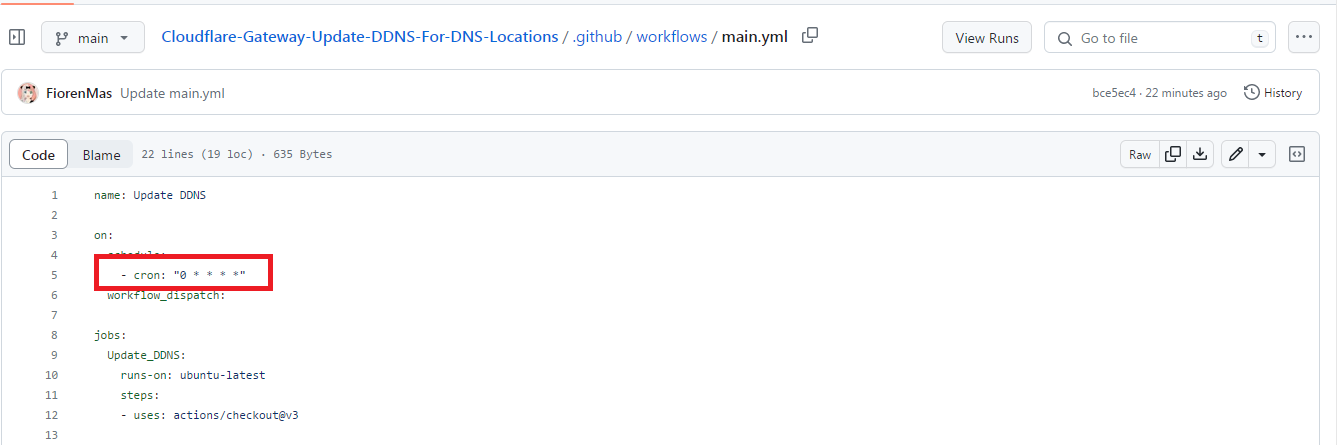
chỉnh cron trong file .yml trong folder workflowLàm thế nào để nó tự động update hàng ngày vậy mọi người. Nó chỉ auto update được một ngày là dừng rồi.
Xem tệp đính kèm 2200765
chỉnh cron trong file .yml trong folder workflow
"0 3 * * 1" thành "0 3 * * *" đúng không bác. Để coi thử có auto update không
Đúng rồi bạn, tính theo giờ UTC/GMT. Format là "phút giờ ***" . Bạn cộng thêm 7 để ra giờ VNChỉnh"0 3 * * 1"thành"0 3 * * *"đúng không bác. Để coi thử có auto update không
Link này bị thiếu dấu hai chấm:
https(:)//dash.cloudflare.com/sign-up

là sao vậyFix lại link đi chủ thớthttp://https//dash.cloudflare.com/sign-up
Chắc ý là thiếu dấu :là sao vậy
sếp ơi làm thử cách 2 kiểm tra tất cả Secret Action fork lại 2 lần rồi mà vẫn bị dính lỗi {"success":false,"errors":[{"code":10000,"message":"Authentication error"}]}Cách cài đặt DDNSLưu ý: Cách này có hơi vi phạm luật của github... Cho nên tài khoản github có thể bị khóa, nên tạo account phụ để làm.
1/ Tạo DDNS và gắn DDNS vào trong router:
Xem thêm ở thread NextDNS mục IV
thảo luận - Tất tần tật về dịch vụ nextDNS (https://voz.vn/t/tat-tan-tat-ve-dich-vu-nextdns.522718/)
2/ Fork repo này:
GitHub - FiorenMas/Cloudflare-Gateway-Update-DDNS-For-DNS-Locations (https://github.com/FiorenMas/Cloudflare-Gateway-Update-DDNS-For-DNS-Locations)
2/ Vào trang này:
Cloudflare One (https://one.dash.cloudflare.com/)
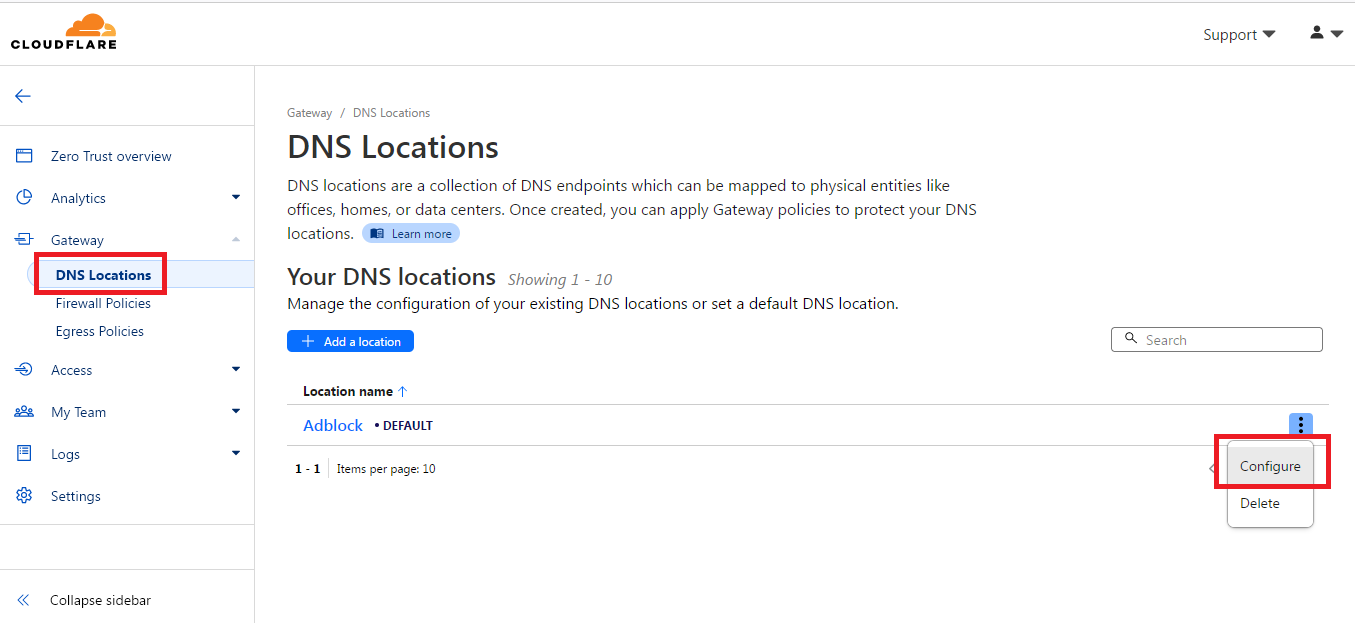
Rồi vào đây:

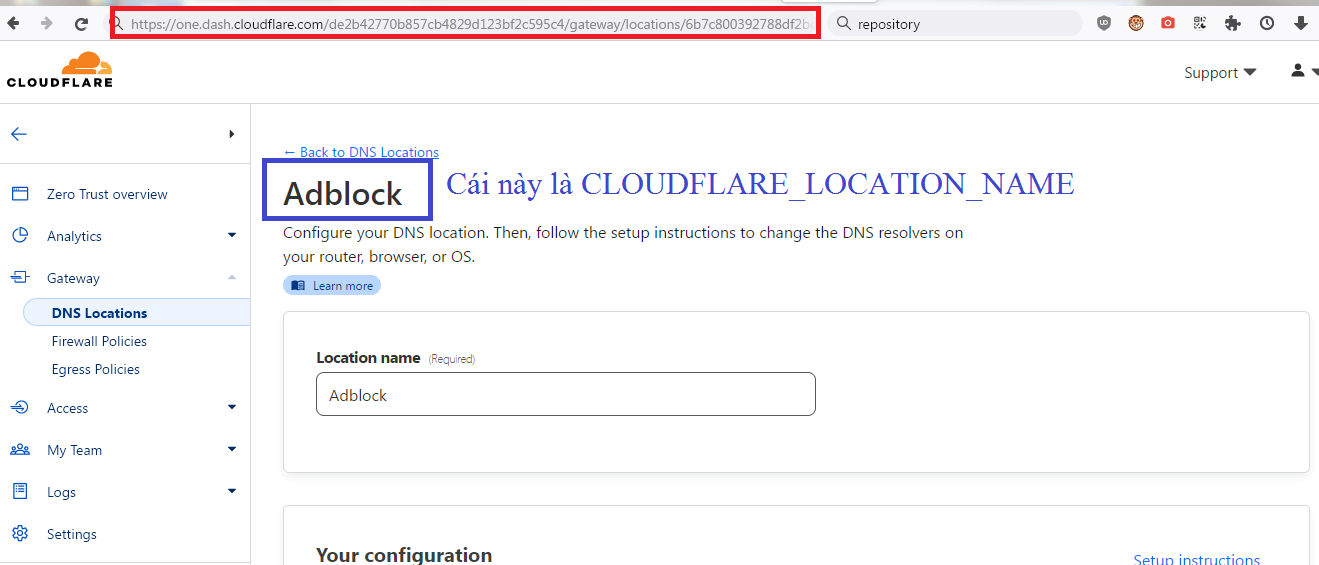
Nhìn lên thanh địa chỉ có url như sau:
https://one.dash.cloudflare.com/de2b42770b857cb4829d123bf2c595c4/gateway/locations/6b7c800392788df2be76d3224a0c6766/edit
Đằng trước/gateway/locations/làde2b42770b857cb4829d123bf2c595c4gọi làCLOUDFLARE_ACCOUNT_ID
Đằng sau/gateway/locations/là6b7c800392788df2be76d3224a0c6766gọi làCLOUDFLARE_LOCATION_ID
Thêm các Secret Action theo các bước như #1 đã hướng dẫn:
CLOUDFLARE_API_KEY Như #1 CLOUDFLARE_ACCOUNT_ID Như #1 CLOUDFLARE_ACCOUNT_EMAIL Như #1 CLOUDFLARE_LOCATION_ID Như trên đã giải thích CLOUDFLARE_LOCATION_NAME Như trên đã giải thích DDNS_HOSTNAME Tên DDNS tạo ở trang dynu
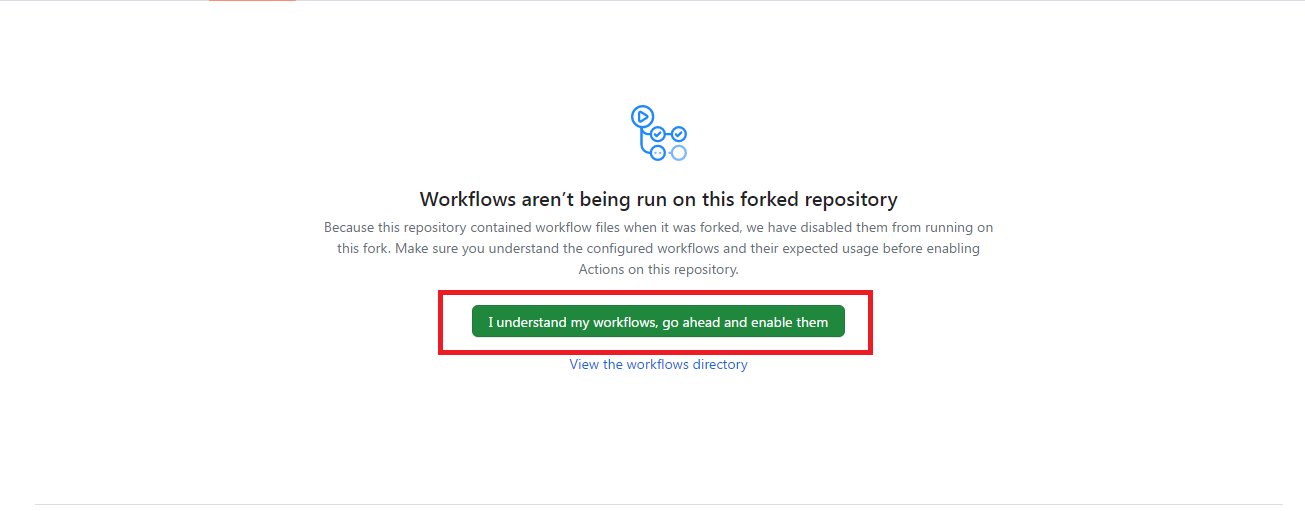
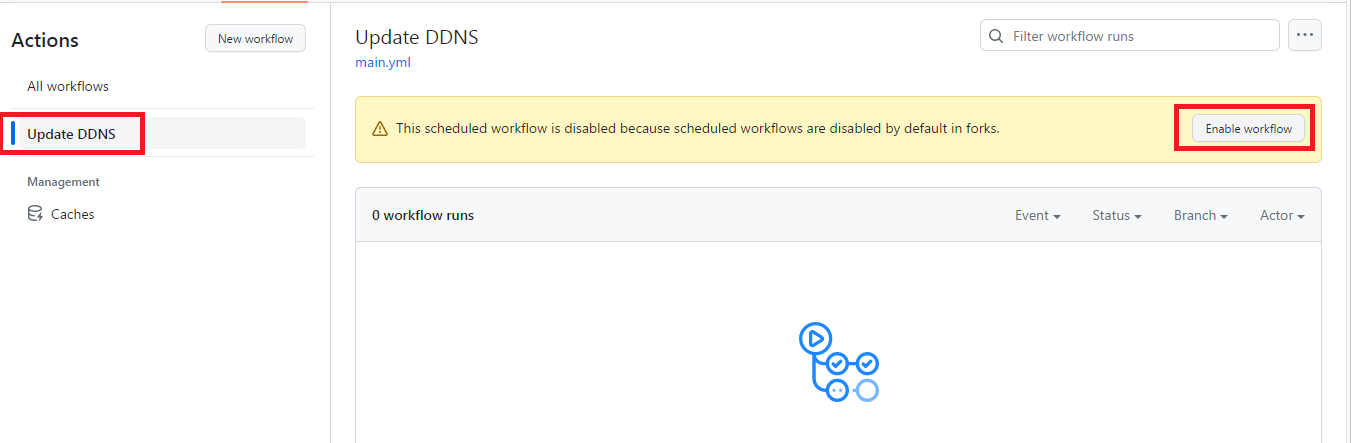
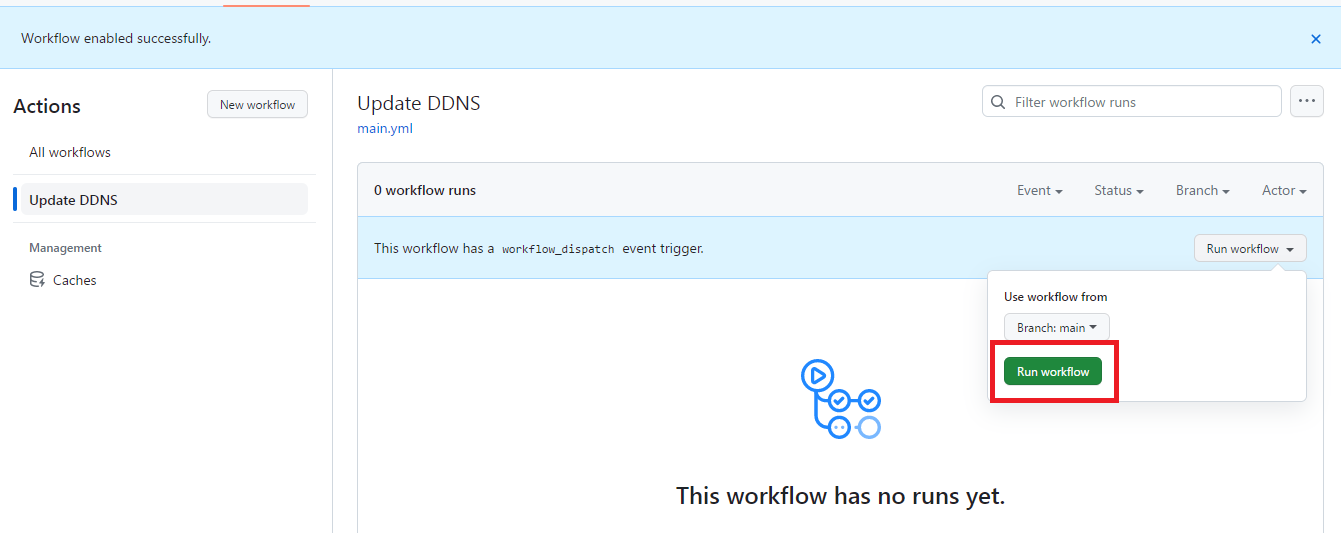
Sau khi thêm xong vào tab Action nhấn vào đây:
Mặc định là cứ 1 giờ sẽ cập nhật DDNS 1 lần, có thể rút ngắn thời gian lại bằng cách sửa file main.yml chỗ này thành ý thích
Một vài giá trị tham khảo:
30 phút:*/30 * * * *
10 phút:*/10 * * * *
5 phút:*/5 * * * *

cái này t dùng api key, fen dùng api token hay api keysếp ơi làm thử cách 2 kiểm tra tất cả Secret Action fork lại 2 lần rồi mà vẫn bị dính lỗi {"success":false,"errors":[{"code":10000,"message":"Authentication error"}]}
DDNS_HOSTNAME bắt buộc phải tạo ở Tên DDNS tạo ở trang dynu hay dùng duckdns cũng được hả thím
Xem tệp đính kèm 2204399
thank sếp thay api key vào là chạy bon bon rồicái này t dùng api key, fen dùng api token hay api key

bác cho hỏi chạy trên DOH edge sao ping đẹp như nextdns mà tới khi add cứng vào router lại ping toàn hơn 200 nhỉcái này t dùng api key, fen dùng api token hay api key


thấy ipv4 nó nhảy ra nhiều server hơn đó bác chắc đó là lí do ping cao hơn.bác cho hỏi chạy trên DOH edge sao ping đẹp như nextdns mà tới khi add cứng vào router lại ping toàn hơn 200 nhỉ
DOT
Xem tệp đính kèm 2204765
add ip4 router
Xem tệp đính kèm 2204785


Bạn giảm tần suất chạy update để tránh lỗi. Mình thấy không cần thiết phải chạy hàng ngày nên cho chạy 2 lần trong tháng.Dạo này chạy hay bị lỗi quá ta, ko biết có cần sửa gì ko các fen