thảo luận Hướng dẫn dùng Cloudflare Zero Trust

  • Người tạo chủ đề Người tạo chủ đề Fioren
  • Ngày bắt đầu Ngày bắt đầu
Để 1 nha bác, 1 vs 0 giống như bật tắt vậy ý.
Fast mode hiểu là thay vì mình request chậm tới CF API, kiểu phải đợi 200ms để tiếp tục request tiếp theo, thì mình gửi nguyên hết tất cả request tới luôn một lần cho CF xử lí, giới hạn 1200 requests để bạn không gửi quá nhiều làm quá tải máy chủ ấy mà.
Em xin cám ơn!
 
Sáng nay cái Update Filter List nó update mới thấy cái lỗi này mới, tức là nó create list các kiểu oke nhưng tới phần tạo list CGPS List - Chunk xxx thì nó tạo được tới Chunk 006 là nghỉ, từ 007 đổ lên là báo error (rule của mình tầm 100k, thường nó sẽ tạo tới Chunk 96) nhưng nó vẫn báo Update Filter List thành công
Sau đó phải vào chạy lại bằng tay thì mới đủ rule (Chunk 94)
Mình đã nói trường hợp này từ lâu rồi nhưng có vẻ mọi người không tin
 
file .yml của e update giống bác chủ rồi sao chạy bị lỗi này nhỉ?? ai chỉ e cách fix với
Mã:
Run node cf_gateway_rule_delete.js

IMPORTANT: Your Node.js version doesn't have native fetch support and may not be supported in the future. Please update to v18 or later.

Since you're running in GitHub Actions, you should update your Actions workflow configuration to use Node v18 or higher.
file:///home/runner/work/cloudflare-gateway-pihole-scripts/cloudflare-gateway-pihole-scripts/cloudflare-gateway-pihole-scripts/lib/helpers.js:24
    throw new Error(
          ^

Error: One or more required secrets have not been added: CLOUDFLARE_API_KEY, CLOUDFLARE_ACCOUNT_ID, and CLOUDFLARE_ACCOUNT_EMAIL
    at request (file:///home/runner/work/cloudflare-gateway-pihole-scripts/cloudflare-gateway-pihole-scripts/cloudflare-gateway-pihole-scripts/lib/helpers.js:24:11)
    at requestGateway (file:///home/runner/work/cloudflare-gateway-pihole-scripts/cloudflare-gateway-pihole-scripts/cloudflare-gateway-pihole-scripts/lib/helpers.js:57:3)
    at getZeroTrustRules (file:///home/runner/work/cloudflare-gateway-pihole-scripts/cloudflare-gateway-pihole-scripts/cloudflare-gateway-pihole-scripts/lib/api.js:141:3)
    at file:///home/runner/work/cloudflare-gateway-pihole-scripts/cloudflare-gateway-pihole-scripts/cloudflare-gateway-pihole-scripts/cf_gateway_rule_delete.js:3:33

Nó bảo update lên nodejs 18 mà e ko biết up kiểu gì cả :( ( chưa dùng job trên github bao giờ :( )
 
file .yml của e update giống bác chủ rồi sao chạy bị lỗi này nhỉ?? ai chỉ e cách fix với
Mã:
Run node cf_gateway_rule_delete.js

IMPORTANT: Your Node.js version doesn't have native fetch support and may not be supported in the future. Please update to v18 or later.

Since you're running in GitHub Actions, you should update your Actions workflow configuration to use Node v18 or higher.
file:///home/runner/work/cloudflare-gateway-pihole-scripts/cloudflare-gateway-pihole-scripts/cloudflare-gateway-pihole-scripts/lib/helpers.js:24
    throw new Error(
          ^

Error: One or more required secrets have not been added: CLOUDFLARE_API_KEY, CLOUDFLARE_ACCOUNT_ID, and CLOUDFLARE_ACCOUNT_EMAIL
    at request (file:///home/runner/work/cloudflare-gateway-pihole-scripts/cloudflare-gateway-pihole-scripts/cloudflare-gateway-pihole-scripts/lib/helpers.js:24:11)
    at requestGateway (file:///home/runner/work/cloudflare-gateway-pihole-scripts/cloudflare-gateway-pihole-scripts/cloudflare-gateway-pihole-scripts/lib/helpers.js:57:3)
    at getZeroTrustRules (file:///home/runner/work/cloudflare-gateway-pihole-scripts/cloudflare-gateway-pihole-scripts/cloudflare-gateway-pihole-scripts/lib/api.js:141:3)
    at file:///home/runner/work/cloudflare-gateway-pihole-scripts/cloudflare-gateway-pihole-scripts/cloudflare-gateway-pihole-scripts/cf_gateway_rule_delete.js:3:33

Nó bảo update lên nodejs 18 mà e ko biết up kiểu gì cả :( ( chưa dùng job trên github bao giờ :( )
Thiếu secret kìa bạn, bạn kiểm tra lại
 
Thiếu secret kìa bạn, bạn kiểm tra lại
oh e add nhầm secret key vào variable , để e thử lại ạ. Bác cho e hỏi thêm, cái phần tạo dns location trên cloundflare địa chỉ ip nó tự nhận theo public ip của mình, lúc sau router nhà mình mất điện, nó sinh public ip khác thì vào cập nhật lại ah bác ??
Mục DoT server URL thì điền url ở bước "chuẩn bị"
Cái này nữa ạ em lấy cái link DNS over HTTPS ở trên "Setup Instruction for ..." (https://abcxyzblabla.cloudflare-gateway.com/dns-query) ở cloundflare paste vào mà nó toàn báo
Entering custom ports (e.g. :853) for DoT is not supported. Please remove it.
 
Sửa lần cuối:
oh e add nhầm secret key vào variable , để e thử lại ạ. Bác cho e hỏi thêm, cái phần tạo dns location trên cloundflare địa chỉ ip nó tự nhận theo public ip của mình, lúc sau router nhà mình mất điện, nó sinh public ip khác thì vào cập nhật lại ah bác ??
Dùng DoH hoặc DoT thì k cần quan tâm vụ này, còn dùng ipv4 thì phải cập nhật lại
 
oh e add nhầm secret key vào variable , để e thử lại ạ. Bác cho e hỏi thêm, cái phần tạo dns location trên cloundflare địa chỉ ip nó tự nhận theo public ip của mình, lúc sau router nhà mình mất điện, nó sinh public ip khác thì vào cập nhật lại ah bác ??

Cái này nữa ạ em lấy cái link DNS over HTTPS ở trên "Setup Instruction for ..." (https://abcxyzblabla.cloudflare-gateway.com/dns-query) ở cloundflare paste vào mà nó toàn báo
Phần ip đó bạn không cần quan tâm đâu
DoH: bạn dán vào cài đặt trong trình duyệt
DoT: bạn dán vào cài đặt mạng trên đt Android
Trên dt nếu bạn đặt cả DoT và DoH thì khi dùng trình duyệt, DoH sẽ được sử dụng
DoT sẽ có hiệu lực với các app khác
 
oh e add nhầm secret key vào variable , để e thử lại ạ. Bác cho e hỏi thêm, cái phần tạo dns location trên cloundflare địa chỉ ip nó tự nhận theo public ip của mình, lúc sau router nhà mình mất điện, nó sinh public ip khác thì vào cập nhật lại ah bác ??

Cái này nữa ạ em lấy cái link DNS over HTTPS ở trên "Setup Instruction for ..." (https://abcxyzblabla.cloudflare-gateway.com/dns-query) ở cloundflare paste vào mà nó toàn báo
Nếu DoH, DoT thì cứ gán thẳng vô trình duyệt hoặc cài đặt mạng của đt, còn nếu muốn xài link ip4 chay trên router thì làm theo hướng dẫn của thím @ndhuy2308 như bên dưới, bảo đảm link update 100%
Hướng dẫn sử dụng Cloudflare Worker để cập nhật IP match với Cloudflare qua DDNS:
Tại sao nên dùng: Bạn có thể set dns dạng 172.64.36.1, 172.64.36.2 thẳng vào router và sử dụng cho tất cả các thiết bị mạng có trong nhà mà không cần phải dùng DoH, DoT. Tốc độ truy vấn rất nhanh
  • Yêu cầu có ddns trỏ về IP nhà.
  • Cloudflare API, Cloudflare Email, API Key, Cloudflare ID (có hướng dẫn lấy tại #1)
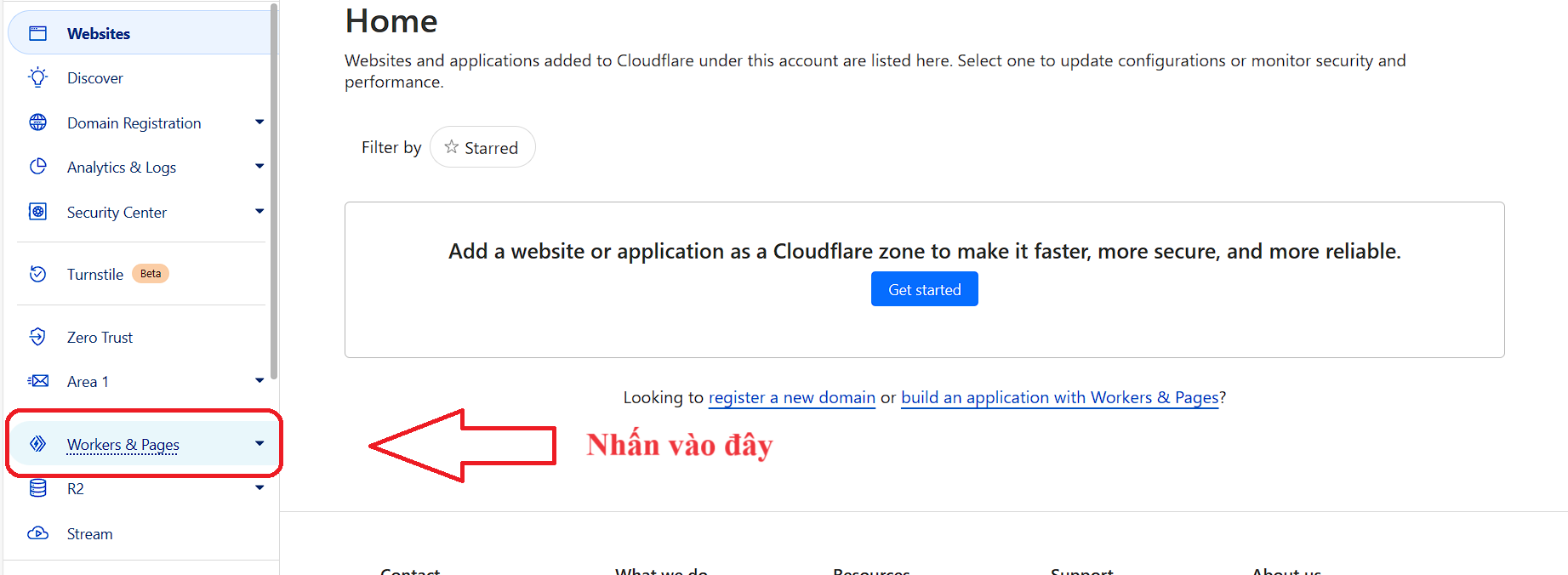
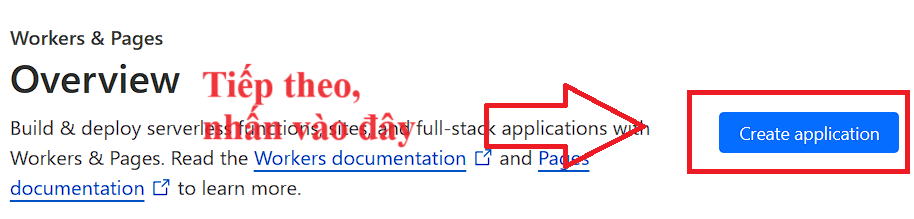
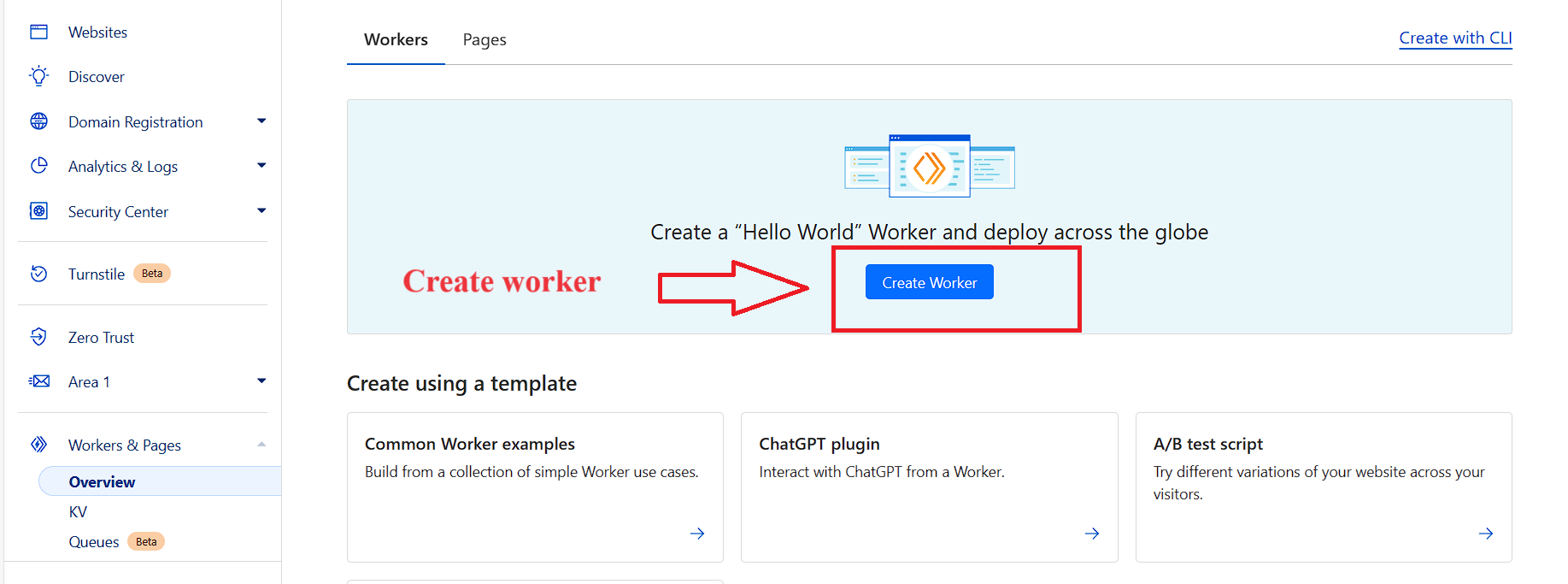
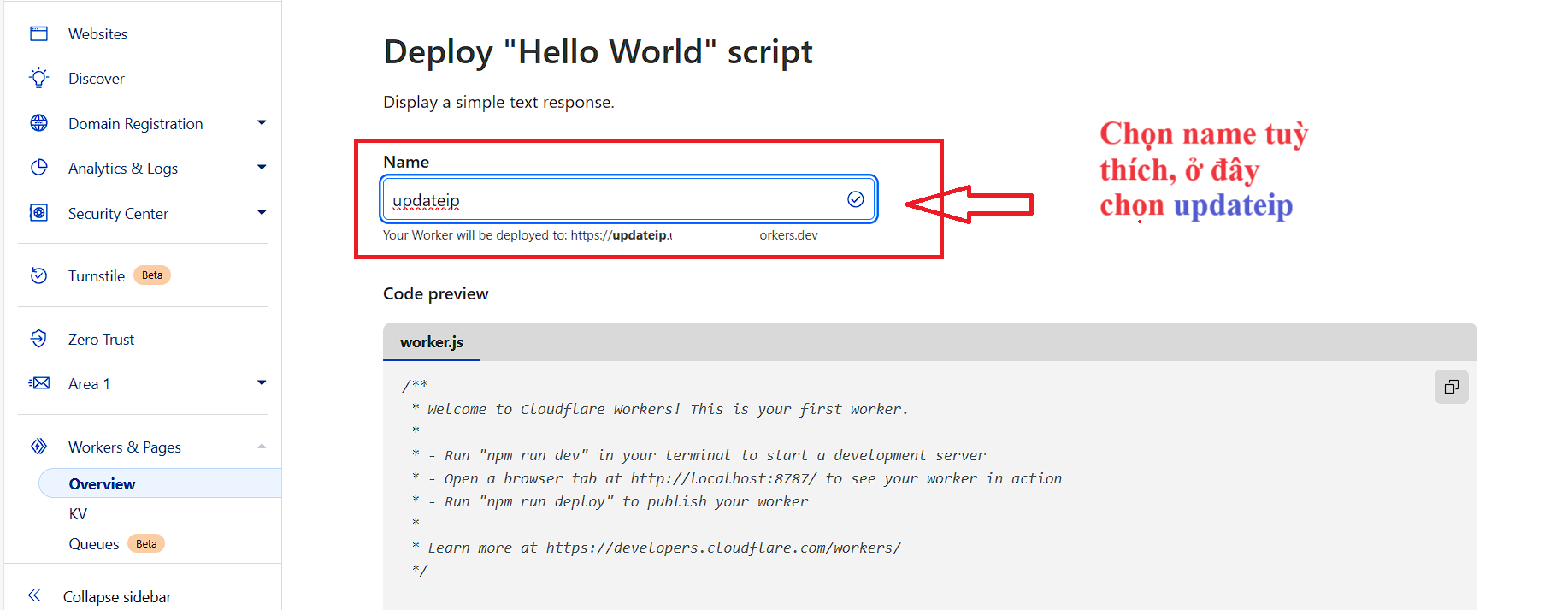
(1) Tạo Worker và chỉnh sửa code theo code dưới đây:
OqargG6.png

Tiếp theo
D1c93dC.png

Tiếp theo
MtT1t73.png
Tiếp theo, nhập Name cho Worker
Tx5e8on.png

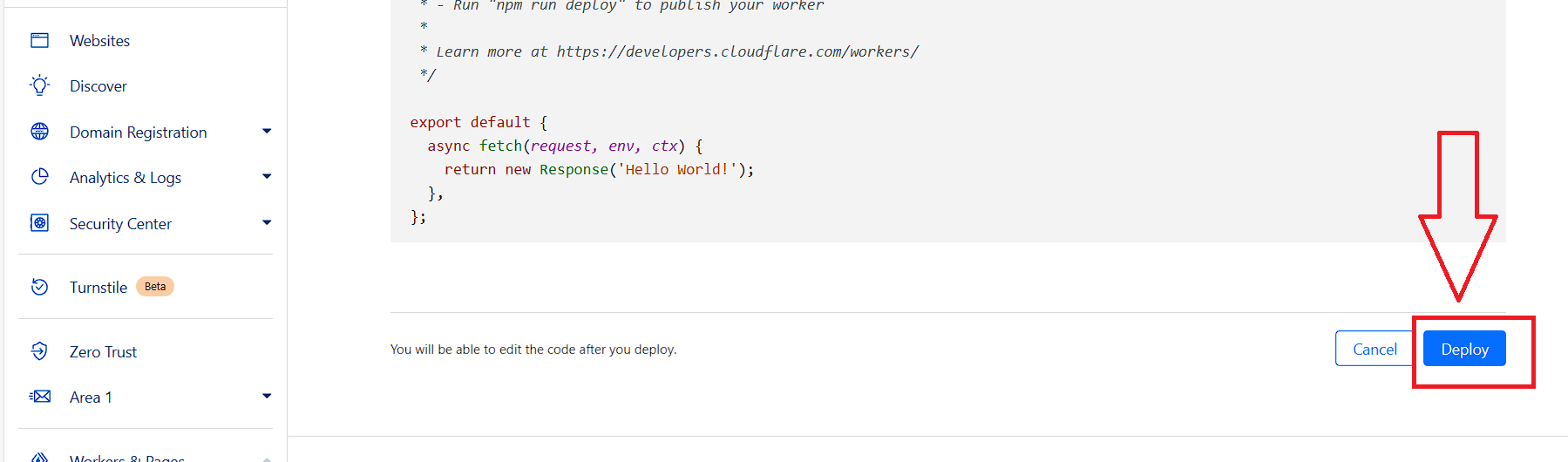
Kéo xuống cuối trang nhấn Deploy
EowsqQ5.png

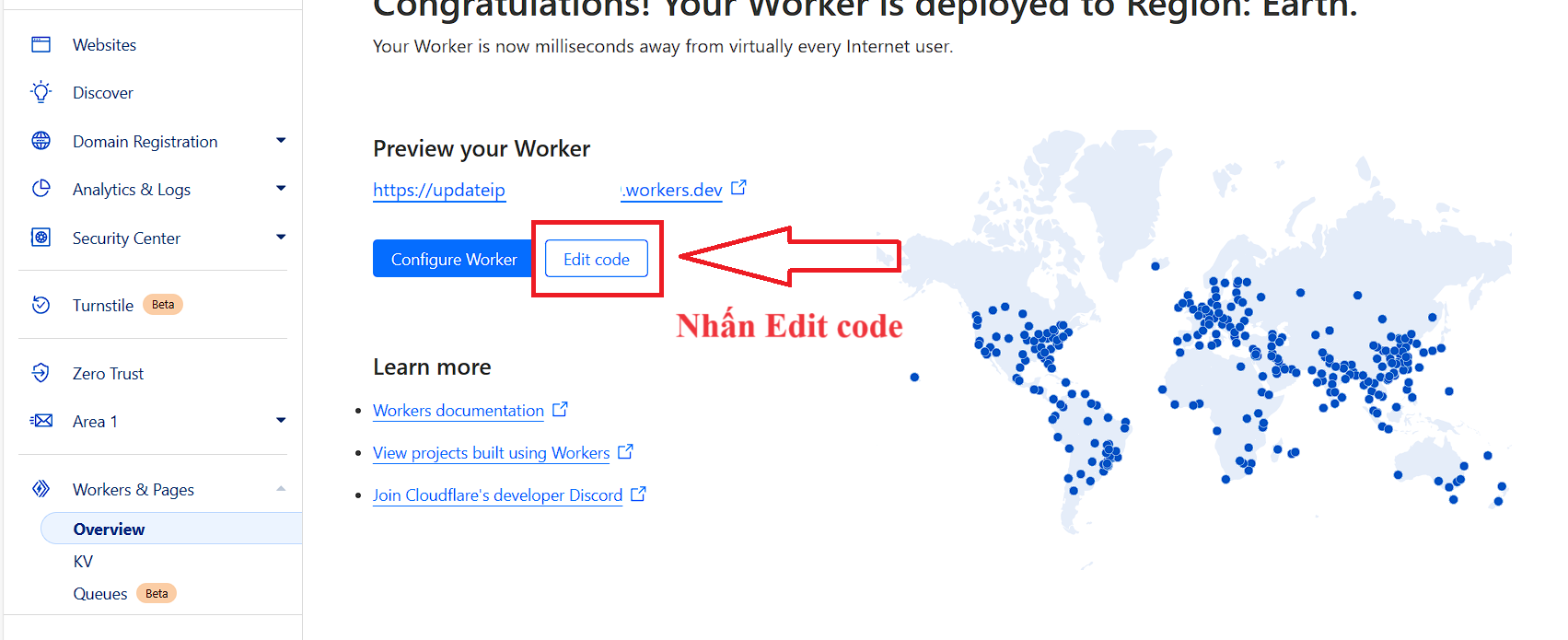
Tiếp theo, nhấn Edit code
0aUoPq9.png

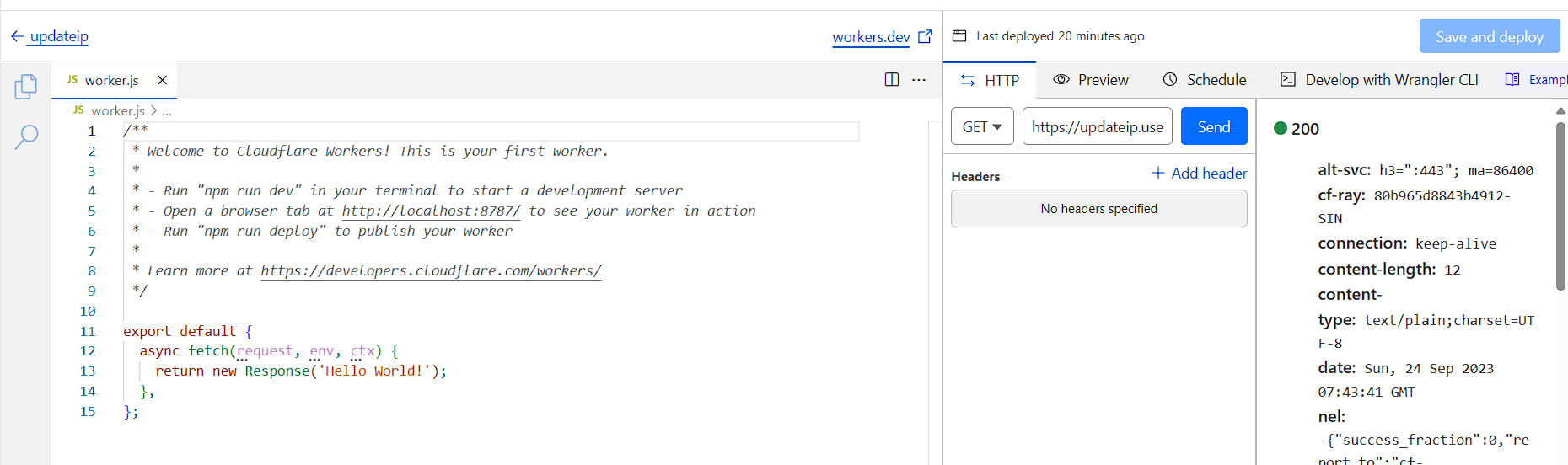
Tiếp theo, xoá tất cả các code, sửa code theo dưới đây:
IpczZnM.png

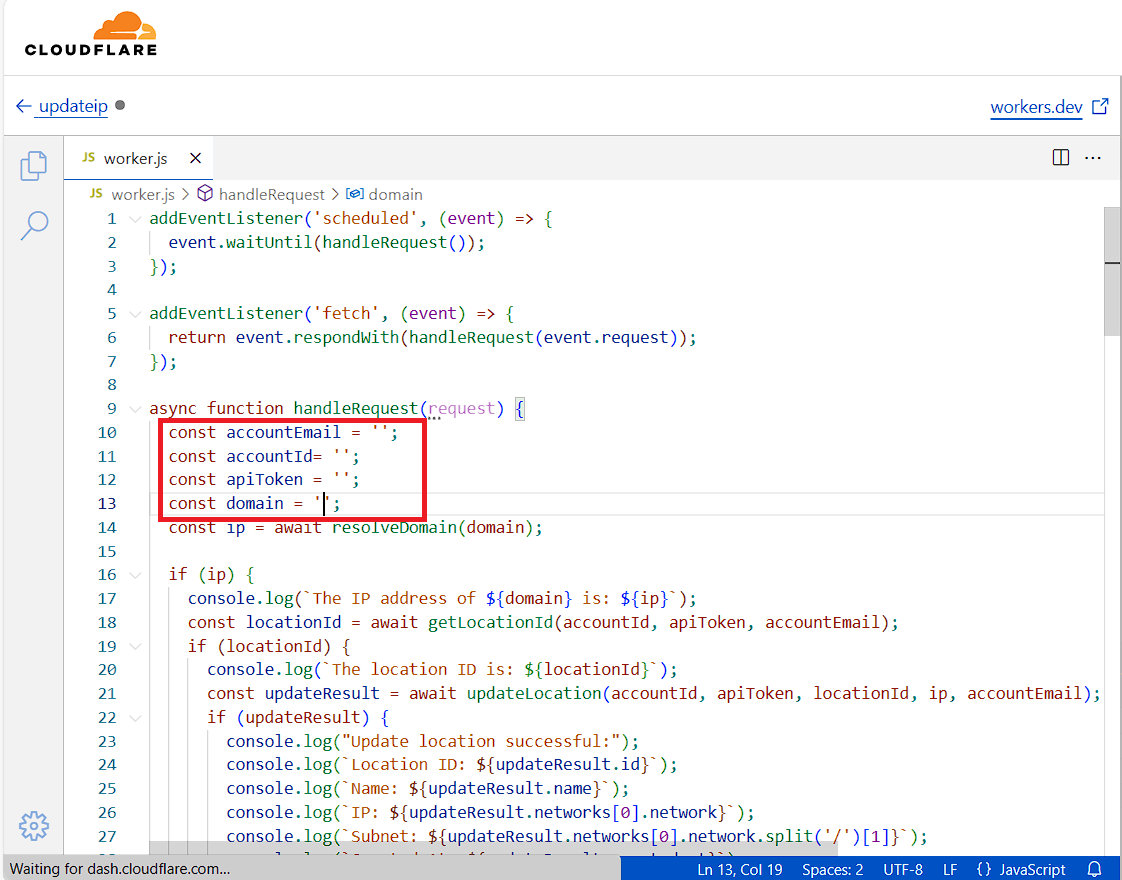
Điền các thông tin sau:
TZVbNKN.png

- Chỉnh sửa các thông tin: accountEmail, accountId (Cloudflare ID), apiKey, domain (DDNS của bạn).
Mã:
addEventListener('scheduled', (event) => {
  event.waitUntil(handleRequest());
});

addEventListener('fetch', (event) => {
  return event.respondWith(handleRequest(event.request));
});

async function handleRequest(request) {
  const accountEmail = '';
  const accountId= '';
  const apiToken = '';
  const domain = '';
  const ip = await resolveDomain(domain);

  if (ip) {
    console.log(`The IP address of ${domain} is: ${ip}`);
    const locationId = await getLocationId(accountId, apiToken, accountEmail);
    if (locationId) {
      console.log(`The location ID is: ${locationId}`);
      const updateResult = await updateLocation(accountId, apiToken, locationId, ip, accountEmail);
      if (updateResult) {
        console.log("Update location successful:");
        console.log(`Location ID: ${updateResult.id}`);
        console.log(`Name: ${updateResult.name}`);
        console.log(`IP: ${updateResult.networks[0].network}`);
        console.log(`Subnet: ${updateResult.networks[0].network.split('/')[1]}`);
        console.log(`Created At: ${updateResult.created_at}`);
        console.log(`Updated At: ${updateResult.updated_at}`);
      } else {
        console.log("No location data found.");
      }
    } else {
      console.log("No locations found.");
    }
  } else {
    console.log(`Failed to resolve the IP address of ${domain}`);
  }

  return new Response('Worker execution completed', { status: 200 });
}

async function resolveDomain(domain) {
  const apiURL = 'https://dns.google.com/resolve';
  const queryURL = new URL(apiURL);
  queryURL.searchParams.append('name', domain);
  queryURL.searchParams.append('type', 'A');

  const response = await fetch(queryURL);
  const data = await response.json();

  if (data.Answer instanceof Array && data.Answer.length > 0) {
    const ipAddresses = data.Answer
      .filter(answer => answer.type === 1)
      .map(answer => answer.data);
    return ipAddresses[0] || null;
  } else {
    return null;
  }
}

async function getLocationId(accountId, apiToken, accountEmail) {

  const url = `https://api.cloudflare.com/client/v4/accounts/${accountId}/gateway/locations`;

  const response = await fetch(url, {
    headers: {
      'Authorization': `Bearer ${apiToken}`,
      'Content-Type': 'application/json',
      'X-Auth-Email': accountEmail,
      'X-Auth-Key': apiToken
    }
  });

  if (response.ok) {
    const data = await response.json();
    const result = data.result;
    return result.length > 0 ? result[0].id : null;
  } else {
    return null;
  }
}

async function updateLocation(accountId, apiToken, locationId, ip, accountEmail) {
  const url = `https://api.cloudflare.com/client/v4/accounts/${accountId}/gateway/locations/${locationId}`;

  const response = await fetch(url, {
    method: 'PUT',
    headers: {
      'Authorization': `Bearer ${apiToken}`,
      'Content-Type': 'application/json',
      'X-Auth-Email': accountEmail,
      'X-Auth-Key': apiToken
    },
    body: JSON.stringify({
      client_default: true,
      ecs_support: true,
      name: 'RouterZTE',
      networks: [
        { network: `${ip}/32` }
      ]
    })
  });

  if (response.ok) {
    const data = await response.json();
    return data.result || null;
  } else {
    return null;
  }
}
=> Save and deploy.
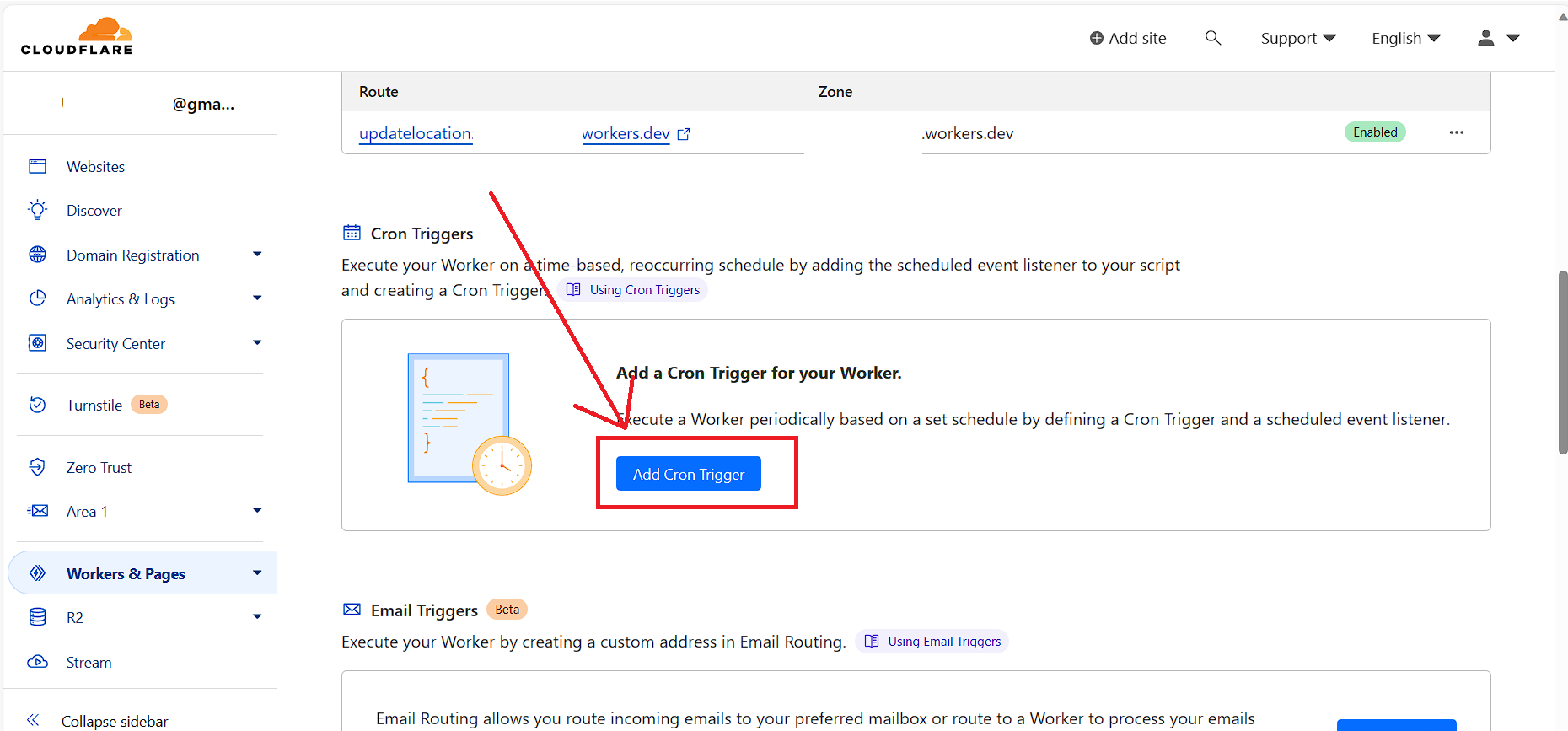
(2) Tạo Cron trigger để tự động chạy script cập nhật IP qua DDNS mỗi 1 phút (rất nhanh).
uxUmAud.png


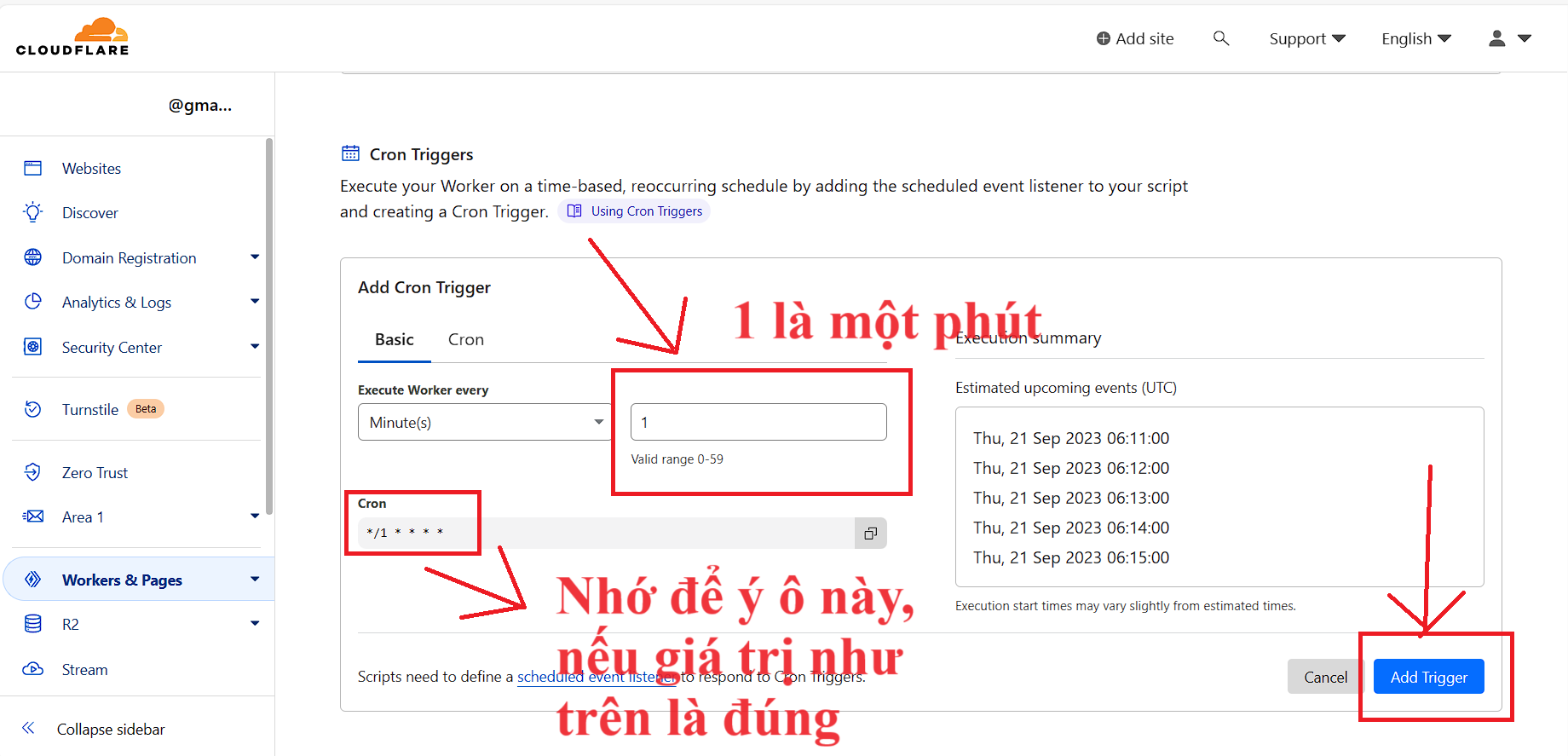
(3) Chỉnh sửa giá trị Minutes là 1 (Chạy worker mỗi phút), sau đó nhấn Add Trigger
QAPmDJl.png


(4) Kết quả như thế này là hoàn tất:
oZXiESp.png


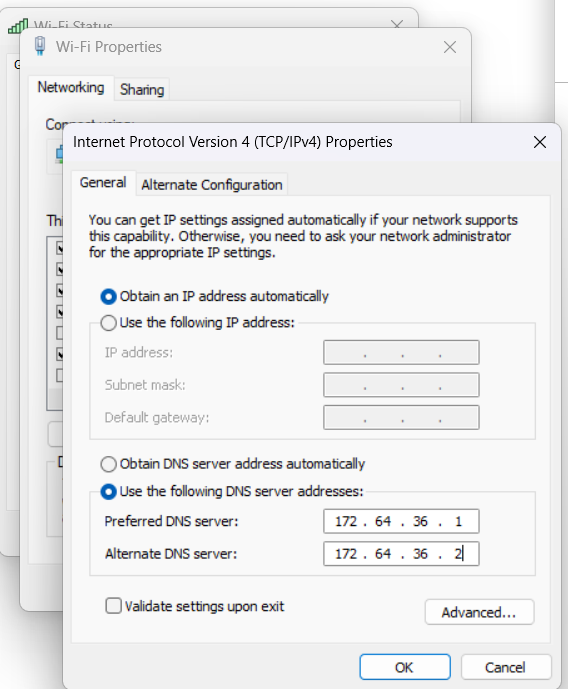
4. Cập nhật DNS cho thiết bị của bạn:
IPV4:

172.64.36.1
172.64.36.2
---
Máy tính:
rX0BoIt.png


Các thiết bị khác tương tự
Tốt nhất là đặt lên Router tổng để áp dụng cho tất cả các thiết bị trong nhà.
5. Kết thúc

Chúc các bạn cấu hình thành công. Sử dụng DNS dạng này cảm giác lướt web rất nhanh, không bị lỗi DoH (Mikrotik DoH không ổn định).
Kiểm tra xem đã chặn quảng cáo chưa:
Link 1:
Test Ad Block - Toolz (https://d3ward.github.io/toolz/adblock.html)
Link 2: AdBlock Test (https://iblockads.net/test)
Nhớ flush dns trước khi test nhé.
CMD: ipconfig /flushdns
*đã cập nhật ảnh lỗi
 
Mã:
Error: {"command":"git --no-pager log -1 --format=%ct","exitCode":128,"outputData":"","errorData":"fatal: not a git repository (or any of the parent directories): .git\n"}

Lỗi này xử lý sao được các bác ơi, giúp e với ạ
 
Ngồi mò mẫm đọc code đọc hướng dẫn mãi thì nó cũng chạy được các bác ợ, em setting chrome thế này chuẩn chưa ạ? Giờ có cách nào để check nó hoạt động nhỉ
Screenshot 2023-10-29 at 01.00.11.png
 
Ngồi mò mẫm đọc code đọc hướng dẫn mãi thì nó cũng chạy được các bác ợ, em setting chrome thế này chuẩn chưa ạ? Giờ có cách nào để check nó hoạt động nhỉ
Xem tệp đính kèm 2152443
Tắt hết extension chặn quảng cáo đi. Vào web anonyviet.com xem còn quảng cáo không. Vào dnscheck.tools xem nó hiện Cloudflare là được rồi
 

Thống kê chủ đề

Ngày tạo
Fioren,
Người trả lời cuối
tuananhhd88,
Trả lời
4.335
Lượt xem
418.174
Quay lại
Lên đầu trang